Documentation
Complete guide to using QNotes AI for lectures, meetings, and study sessions
Welcome to QNotes AI
QNotes AI is your intelligent companion for capturing and organizing lecture notes, meeting transcripts, and study materials. Using advanced AI technology, we transform audio into actionable, searchable notes that help you learn better and remember more.
Browser Extension (Chrome & Firefox)
🚀 Installation
- Chrome: Visit the Chrome Web Store and click "Add to Chrome"
- Firefox: Visit the Firefox Add-ons Store and click "Add to Firefox" (Coming Soon)
- Pin the extension to your browser toolbar for easy access
- Sign in with your QNotes account or create a new one
✨ Supported Platforms
YouTube
Capture lectures, tutorials, and educational videos
Udemy
Transcribe course videos and create study notes
Any Audio
Works with any audio playback in your browser
📖 How to Use
- Navigate to your lecture or video
Open YouTube, Udemy, or any website with audio/video content in your browser
- Click the QNotes extension icon
The extension will automatically detect audio playing in your current tab
- Start recording
Click the "Start Recording" button. The extension will capture the tab audio or your microphone
- Watch the magic happen
Real-time transcription appears in the extension popup. AI processes and summarizes as you record
- Stop and review
Click "Stop Recording" when done. Your notes are automatically saved to your dashboard
💡 Pro Tip: You can pause and resume recording at any time. All segments will be combined into one complete transcript.
Mobile App (Android)
The QNotes mobile app brings the power of AI transcription to your pocket. Perfect for recording lectures on the go, capturing study group discussions, or taking voice notes anywhere.
📱 Features
- •High-quality audio recording: Optimized for lecture halls and classrooms
- •Background recording: Keep recording even when your phone is locked
- •Offline mode: Record without internet, sync later when connected
- •Smart organization: Automatically organize notes by date, subject, or custom tags
- •Live transcription: See transcription in real-time as you record
🎯 How to Use
- Download the app
Get QNotes from the Google Play Store (Coming Soon)
- Grant necessary permissions
Allow microphone and storage access for recording and saving your notes
- Create a session
Tap the record button and give your session a name (e.g., "Physics Lecture - Chapter 5")
- Record your lecture
Place your phone on your desk or in your pocket. The app optimizes for voice clarity
- Review and edit
After recording, review the transcript, add highlights, or make corrections
How QNotes Works
QNotes AI uses a sophisticated multi-model architecture to process your audio and deliver accurate, meaningful notes. Here's what happens behind the scenes:
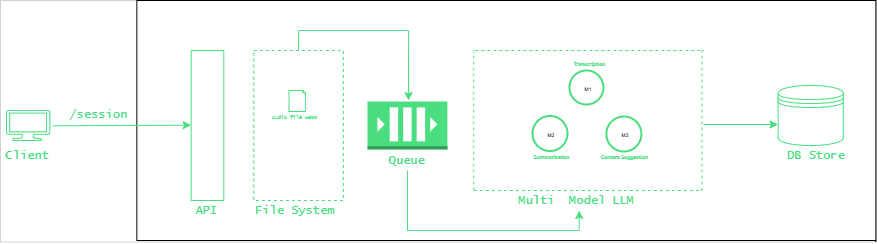
QNotes AI Multi-Model Processing Pipeline
Audio Capture
High-fidelity audio is captured from your browser tab or mobile microphone. Audio is streamed in real-time for processing.
AI Processing
Multiple specialized AI models work together: speech-to-text for transcription, NLP for understanding context, and summarization models for key points.
Smart Notes
Processed content is organized into searchable notes with summaries, key concepts, and study points—ready for your review.
Privacy & Data Security
Your Privacy is Our Priority
We understand that your lecture notes and study materials are personal and valuable. That's why we've built QNotes with privacy and security at its core.
🔒 How We Protect Your Data
No Raw Audio Storage
We do not save or store your raw audio files. Audio is processed in real-time and immediately discarded after transcription is complete. Only the resulting text notes are stored.
User-Specific Data Isolation
All your notes, transcripts, and study materials are saved exclusively under your unique user ID. No one else—not even QNotes staff—can access your personal notes.
Row-Level Security (RLS)
We implement database-level security policies (Row-Level Security) to ensure that your data can only be accessed by you. Even in the unlikely event of a database breach, your notes remain protected and encrypted with your user credentials.
End-to-End Encryption
All data transmission between your device and our servers uses industry-standard TLS/SSL encryption. Your notes are encrypted both in transit and at rest.
You Own Your Data
You can export all your notes at any time in multiple formats (PDF, TXT, JSON). You can also permanently delete your account and all associated data with one click.
📌 Important: While we process your audio for transcription, the processing happens in isolated, secure environments and audio data is never written to permanent storage.
Frequently Asked Questions
Q: Does QNotes work with live lectures?
Yes! Both the browser extension and mobile app can record live audio. The mobile app is especially designed for in-person lectures with optimized audio capture for classroom environments.
Q: Can I edit the transcripts?
Absolutely. After processing, you can review and edit any transcript to fix errors or add your own notes.
Q: What languages are supported?
Currently, QNotes supports English with high accuracy. We're actively working on adding support for Hindi, Spanish, French, German, and other major languages.
Q: Is there a limit on recording length?
Free users can record up to 2 hours per session with a monthly limit of 10 hours. Pro users have unlimited recording time.
Q: Can I share my notes with classmates?
Yes! You can generate shareable links for any note or export them as PDF/TXT files to share via email or messaging apps.
Need Help?
Our support team is here to help you get the most out of QNotes AI.